
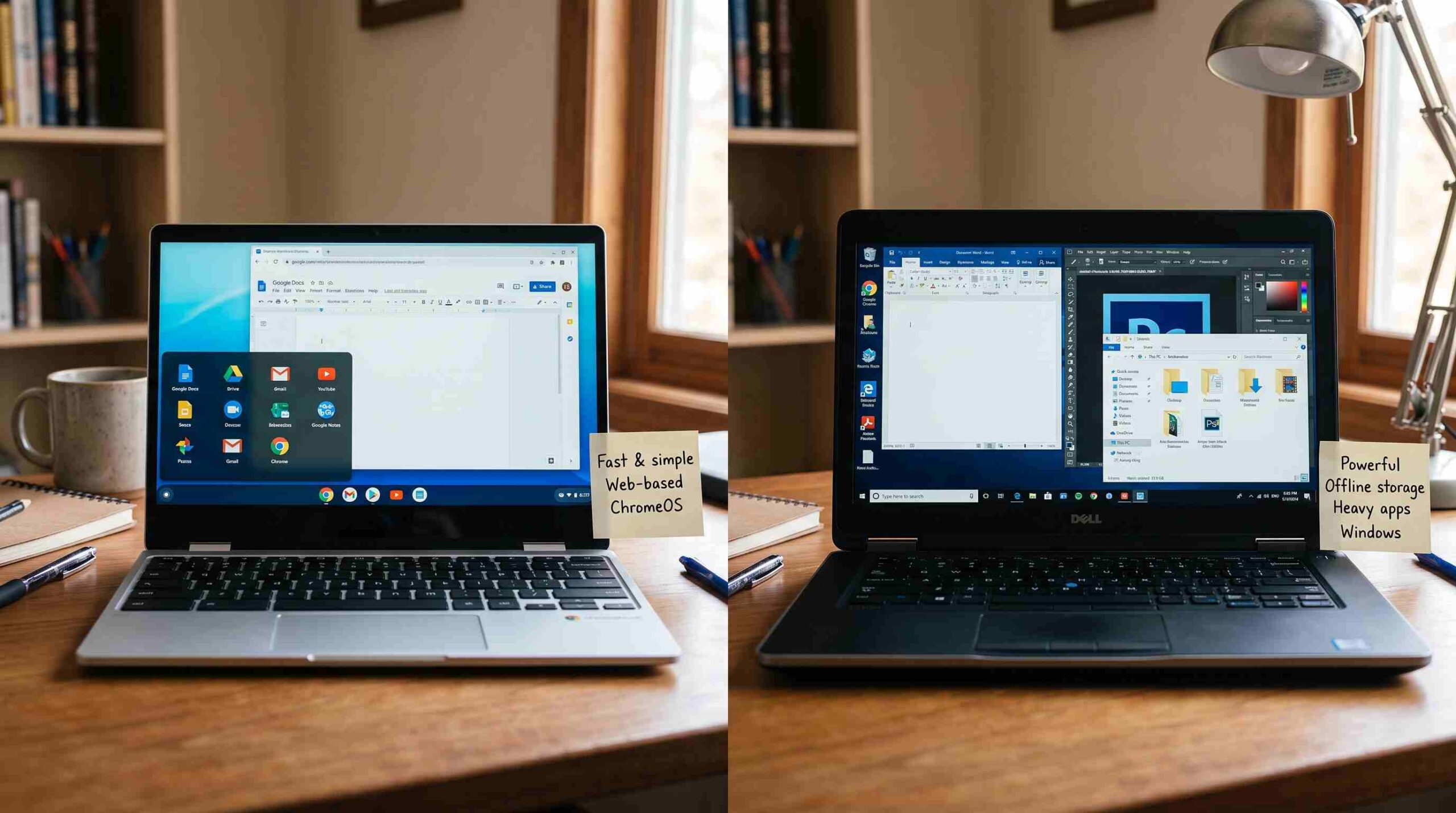
If you’ve started shopping for a new computer, you’ve probably asked this question: what is the difference between a Chromebook and a laptop? It sounds simple. But the answer has a few layers, and getting it wrong can leave you with a machine that doesn’t fit how you actually work or relax online. Let’s break it down in plain language, like a friend explaining it over coffee.
Wait, Isn’t a Chromebook Just a Laptop?
Technically, yes. A Chromebook is a type of laptop. So when people ask about the difference between a Chromebook and a laptop, they usually mean the difference between a Chromebook and a traditional Windows or Mac laptop. That’s the comparison most people actually care about, so that’s what we’ll focus on.
The biggest difference between a Chromebook and a laptop comes down to the operating system. A Chromebook runs Chrome OS, Google’s lightweight, browser-based system. A traditional laptop usually runs Windows or macOS. Both are built to run full desktop software installed directly on the machine.
How They Handle Software
This is where the difference between a Chromebook and a laptop becomes obvious. A Windows or Mac laptop lets you install heavier, dedicated programs. Think the full Adobe Creative Suite, professional video editors, or specialized accounting software. A Chromebook leans on web apps instead. It also supports Android apps from the Google Play Store and Google’s own tools like Docs, Sheets, and Gmail.
For everyday tasks like browsing, email, and streaming, you won’t notice much of a gap. But if your work depends on specific desktop-only software, that’s a clear sign a traditional laptop suits you better than a Chromebook.
Storage and Performance
Another practical difference between a Chromebook and a laptop shows up in storage. Chromebooks build around the cloud. Most models ship with modest local storage, often 64GB to 128GB. The idea is that your files live in Google Drive, not on the hard drive itself. Traditional laptops typically offer much larger local storage, sometimes a terabyte or more. That matters if you work with large files, install big games, or just prefer keeping everything offline.
Performance tells a similar story. Chromebooks aim for efficiency over raw power. Chrome OS runs lighter than Windows or macOS, so even a modest Chromebook can feel snappy for basic tasks. But heavy multitasking, gaming, or resource-intensive editing still favor a well-equipped traditional laptop.
Price Is a Real Factor Too
One of the most appealing parts of this comparison is the price gap. Chromebooks cost less overall. You’ll find plenty of solid options for a few hundred dollars. That affordability explains why schools and budget-conscious buyers favor them. Traditional laptops exist at similar price points too, but you often sacrifice build quality or performance to hit that number. If budget drives your decision, the difference between a Chromebook and a laptop in value for money is hard to ignore.
Battery Life and Portability
Chromebooks tend to win on battery life. Many last 10 hours or more on a single charge, thanks to simplified software and efficient hardware. They’re also usually lighter and more compact. That makes them a favorite among students who carry a laptop between classes all day. Traditional laptops have improved here too, but they still generally can’t match a dedicated Chrome OS machine’s endurance.
Internet Dependency
Here’s something people often overlook in the difference between a Chromebook and a laptop: how much each one needs an internet connection. Chromebooks originally assumed you’d stay online most of the time. That’s less true now, since many Google apps and Android apps offer offline modes. Still, a Chromebook performs best with Wi-Fi.
A traditional laptop doesn’t carry that dependency. You can install software, store files locally, and keep working without internet access. If you travel often or work somewhere with unreliable connectivity, weigh that factor carefully.
Security and Maintenance
This is an underrated difference between a Chromebook and a laptop. Chrome OS builds security into its core design. Updates happen automatically in the background. Each app runs in its own sandbox. The system checks its own integrity every time it boots. Google’s security documentation notes that this layered approach helps explain why Chromebooks report far less malware than traditional laptops.
Windows laptops face more malware simply because more people use them. That doesn’t make them unsafe. Good antivirus software and sensible browsing habits go a long way. But they do demand more active maintenance from you.
So, Which One Should You Choose?
At this point, the difference between a Chromebook and a laptop should feel less like a mystery. A Chromebook suits you if you mainly browse the web, use Google’s productivity tools, stream media, and want something affordable and low-maintenance. A traditional laptop makes more sense if you need specific desktop software, more local storage, or raw power for demanding tasks like video editing or gaming.
Neither option wins outright. It comes down to matching the machine to how you actually use it. Once you’re honest about your daily habits, the difference between a Chromebook and a laptop stops feeling confusing. It just becomes an easy call.